Thursday, 22 October 2015

Dimension Table Column Types

When you start to learn about BI and data warehousing it can be very daunting when you hear all the technical terms.  It is very easy to get over whelmed when hearing about conformed dimensions, junk dimensions, fact-less tables, slowly changing dimensions, semantic layer, MOLAP, ROLAP and HOLAP (I think you get the idea). 

It was my experience, coming from a traditional programmer/analyst back ground that used a relational model as a database back end, that most of these terms were unfamiliar.  The good news is that with a little effort and study it doesn’t take that long to get familiar with it all. 

A good way to get used to it all is to just break it down bit by bit and digest it slowly.  I have previous posts that describe the use of dimension and fact tables as the foundation of star and snow flake schemas (http://mssqlcanuck.blogspot.ca/2015/10/the-fact-less-facttable-every-noob-to.html and http://mssqlcanuck.blogspot.ca/2015/08/dimensional-modeling-concepts.html). 

I’ll use this post to briefly explain the types of columns that make up a typical dimension table.  I find that once you understand the columns types (and I don’t mean data types like nvarchar, numeric or int) then it is much easier to understand the bigger picture.

Dimension Table Column Types

Dimension tables really describe that facts they are related to.  For example, 16 could be the measure but it doesn't make sense if it isn’t related to a product dimension (RICE) or a unit of measure dimension (KGS).  

These are the types of columns you will find in a dimension table.

Key columns – You will need to be able to uniquely identify each row in a dimension table so you will need key columns. You can use natural keys from the source system or surrogate keys (http://www.kimballgroup.com/1998/05/surrogate-keys/).

Name columns – After you identify a row with a unique key, you will need to be able to refer to the entity with a name.  A report that only contains only keys won't read very well.  For example, you could have a row in a customer dimension that has a key value but you will also want to have a human name to refer to the customer. 

Attribute columns – This column is very important for performing BI analysis.  Quite often in data analytics you will want to create pivot reports on discrete values such as gender or year.  Columns in dimension tables that are discrete and make good candidates to perform pivot tables or graphs are called attribute columns.

Member properties – It wouldn’t make sense to pivot on something like a customer’s address because there would be way too many of them.  However, things like addresses are important to provide additional information on a report.  Columns like address are called member properties and are useful as labels on a report.  It makes sense from a performance stand point to include these types of columns in a dimension table to avoid having to use distributed queries to the source system to get the information.

Lineage columns – These types of columns are used for auditing purposes.  Typically in a data 
warehouse environment the ETL loads are run nightly.  You may want to keep track of which loads are successful or fail and also the load date so you know how current your data is in the warehouse or even which source system provided the data.  This is known as lineage data and is typically not exposed to the report consumer but is very helpful for the DBA and ETL developers.


Example: Customer dimension table 

I’ll do a similar post next week to describe the types of columns you will find on a fact table.
Thanks for reading,


SQL Canuck

Friday, 16 October 2015

UNION ALL and MERGE in SSIS

Recently, I  needed to combine the results of two different queries into one existing dim table.  Our third party vendor changed the way they performed a business requirement.  Our existing SSIS ETL processes had already loaded data into the data warehouse based on the ‘old’ way of doing things but because now there was a new way of doing the same thing we needed to enhance our ETL to take into account the ‘new’ way and load the data into the same existing dim table.

I was able to write a SQL query that used a UNION ALL statement that would combine the old and new way of doing things and I could have put that SQL query into a simple Execute SQL Task control flow but it made more sense to represent the combination of the two queries in a graphic fashion so that the flow was more self-documenting and made more sense to the next person who has to deal with it.

I would put the old query in one OLE DB Source and the new query in another OLE DB Source and then combine them into one destination.  It was easy enough to create the top two sources but when it came time to make the center combination of the two sources I realized there were two options.  I could use the MERGE transformation or the UNION ALL transformation.


Example:  Union All Transformation


Example:  Merge Transformation


I have worked as a Data Warehouse Architect for several years and I have had the opportunity to use the MERGE transformation before but I have not worked with the UNION ALL in a while and I needed to remind myself what was the difference of the two since they appeared so similar.

After some research, it is really quite simple. 

There are only 3 main differences between them.
  1.        Union All will output unsorted data so does not require sorted inputs. 
  2.        Merge requires sorted inputs and will output sorted data.
  3.        Merge can only use 2 inputs.  Union All can accept multiple inputs.


It is quite obvious from the list above that most significant item is how Merge can only use 2 inputs.  
If you have more than 2 inputs that you need to combine then you must use Union All.  

Union All is nicer to work with because you don’t have to mess around with ensuring the inputs are sorted which can require a SORT transformation or just having a SORT clause in your sql query.  

Merge can be very fussy about how you set advanced properties such as IsSorted and SortKey position.

An important similarity between the two transformation is that both require the inputs and outputs to have identical metadata such as compatible data types.

In the end the results are identical so take case to know the differences and choose carefully depending on the nature of you goal.


Thanks for reading,   SQL Canuck

Monday, 5 October 2015

The ‘Fact-less’ Fact Table

The ‘Fact-less’ Fact Table

Every ‘noob’ to data warehousing is aware of the simple concepts of classic star schema model.  

I have a previous blog that describes it found here:


In some of my recent research for other blog entries I came across a term that I have read about in the past but haven’t come seen in a while.  I think terms like this come up when we as data professionals study the true concepts and theory of a subject but in our day to day work life they don’t come up as often.  I’m speaking of the term ‘fact-less fact’ table.

Just as a review, we know the fact table as the table in the middle of the star schema that contains the measurable numeric fields as well as a series of foreign keys that point to the qualifying dimension tables.  This allows us to roll up numeric additive values and relate them to other entities that give the aggregation a context that makes sense.  For example:  ‘28’ by itself doesn’t mean much but when you say ’28 kg of rice’ it makes a lot more sense.  You are applying the dimensions of ‘unit of measure’ (kg) and ‘product’ (rice) to the fact field aggregate of ‘28’.

So what does all this have to do with a fact-less fact table?  

A fact-less fact table is really just an intersection of dimensions.  It contains none of the familiar additive numeric fields we are accustomed to seeing in a fact table.  It consists only of foreign keys that point to dimension tables.  It represents a many to many relationship between dimensions.

The classic example is that of a student information system that tracks attendance.  Imagine a fact table called Student_Attendance and dimension tables called Date, Student, Location, Teacher and Class.  


The event of a student attending a class doesn’t really need a recorded numeric representation in the fact table.  Just by merit of a fact table containing foreign keys from the fact table to the dimension tables means that the student did attend the particular class on that particular day at that particular location.  It just isn’t necessary to record a ‘1’ to represent the event.   To record the numeric additive field would just increase the size of the fact table for no good reason.

Thanks for reading, 


SQL Canuck

Tuesday, 22 September 2015

Data Warehouse Fact Tables and Column Store Indexes


In modern distributed database environments, it has become clear that the weak link, from a performance stand point, is the IO subsystem.  RAM and CPU speeds and reached impressive performance levels but the data access levels have not kept up with those of RAM or CPU.  

This represents a real problem for users of databases and a lost opportunity to keep database management systems, as we know them, a viable tool in a world of exponential data growth.  People simply will not put up with less than optimal performance in today’s fast pace digital world.

The engineers at Microsoft recognized this and introduced the column store index.  The column store index has proven to be incredibly fast for a high percentage of data warehouse queries specifically those targeting large fact tables which are where all the juicy meat is in a data warehouse.

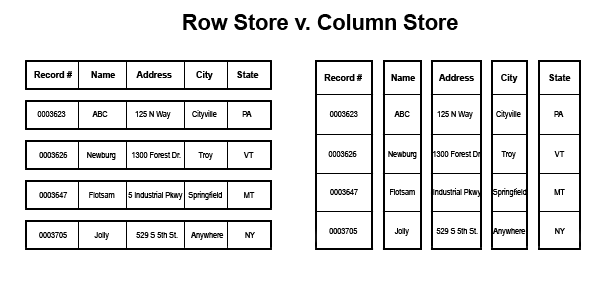
Row Store and Column Store

A traditional B-tree structure in clustered and non-clustered indexes is based on a physical layout of data called a row store.  Simply put data is stored in data pages in your standard spreadsheet type of rows.  A column store turns this all on its head and stores data in a column oriented layout. 

Here is a simple graphic of the differences: (thank you http://arxtecture.com/ for this graphic)


Read what you need

This all seems like a simple enough concept but when you examine what this difference in physical layout really means performance it is actually quite amazing.

If you are querying only a subset of the data from a table and you specify the individual columns then you pull out only the requested data into memory and leave the rest behind.  This is a huge IO savings.

Compression

Also, Microsoft used a very aggressive compression technology from Vertipaq and this technology is hugely effective when using a column based physical layout.  For example:  suppose you have a column such as gender and you only have a handful of possible values.  This type of column that has very low selectivity is an ideal candidate for a high degree of compression.  If you had a fact table with many rows like this and you applied a highly aggressive compression ratio to it you again are decreasing the IO and increasing the performance times.

Ideal for data warehouse fact tables

In today’s modern data warehouses that use traditional star and snow flake schemas, it is not uncommon for fact tables to be incredibly large.  In order to provide a high level of aggregation of the more granular fact details, queries against fact tables are usually range based and implement a lot of scanning, sorting and aggregating of the data.  If the data is stored in a column based physical layout then the savings of IO that come from there being more necessary data per page read into memory, more efficient levels of compression and better memory buffer usage really begins to add up fast.  These benefits combined with the new batch model that the query optimizer offers can increase performance by up to 10x and sometimes up to 100x according to a Microsoft white paper called ‘Enhancements to SQL Server Column Stores.’

There are of course limitations and best practices that should be considered as well so be sure to look into those before you go changing all your indexes into column store indexes.

Thanks for reading,


SQL Canuck

Thursday, 17 September 2015

The Executioner - how is a deadlock victim chosen?

As database professionals we have all read at least a little bit about locks that the database engine uses.  The word locks in database engines have sort of become a swear word but unfairly.  Maybe because locks sounds like blocks we tend to think of locks as a bad thing when really it isn’t.  It is locks that ensure that our data remains consistent which of course is the C in A-C-I-D which of course is essential in ensuring an RDBMS is a viable solution.

The purpose of this blog is not to once again go over all the types of locks because there is plenty of material out there for that but to talk about something that I never really thought about much in the past.  This has to do with the dreaded deadlock.  Again, as database professionals, Im sure we have all seen the classic example of the deadlock.

Ill go over it quickly so we are all on the same page:
  • Transaction 1 gets a shared lock on a row.  
  • Transaction 2 gets a shared lock on a different row.
  • Transaction 1 asks for an exclusive lock on the other row but is blocked by the shared lock that Transaction 2 has on it.
  • Transaction 2 ask for an exclusive lock on the other row but is blocked by the shared lock that Transaction 1 has on it
  •  Transaction 1 can’t finish until Transaction 2 finishes but  Transaction 2 can’t finish because it is blocked by Transaction 1. 


-Technet


Now the reason I have chosen this topic is because recently an SSIS project that I support failed over night and when I examined the All Executions report found in the Information Services Catalogs node of SSMS, I discovered from the error messages that my package had been the victim of a deadlock that was detected.  The error message goes like this: 

Fix : Error 1205 : Transaction (Process ID) was deadlocked on resources with another process and has been chosen as the deadlock victim. Rerun the transaction.

I’d never really given it much thought about how it had been chosen as a victim but having recently passed my Oracle Certified Associate certification, I had read a lot about all the various processes that run in an Oracle instance and perform a variety of jobs.  So it occurred to me that there must be a similar type of process that is running automatically in Sql Server that handles deadlock situations so I did a quick google and looked it up.

There is indeed a dedicated thread that performs deadlock detection. 

The following is from Technet:

'Deadlock detection is performed by a lock monitor thread that periodically initiates a search through all of the tasks in an instance of the Database Engine. The following points describe the search process:
  • The default interval is 5 seconds.
  • If the lock monitor thread finds deadlocks, the deadlock detection interval will drop from 5 seconds to as low as 100 milliseconds depending on the frequency of deadlocks.
  • If the lock monitor thread stops finding deadlocks, the Database Engine increases the intervals between searches to 5 seconds.
  • If a deadlock has just been detected, it is assumed that the next threads that must wait for a lock are entering the deadlock cycle. The first couple of lock waits after a deadlock has been detected will immediately trigger a deadlock search rather than wait for the next deadlock detection interval. For example, if the current interval is 5 seconds, and a deadlock was just detected, the next lock wait will kick off the deadlock detector immediately. If this lock wait is part of a deadlock, it will be detected right away rather than during next deadlock search.

By default, the Database Engine chooses as the deadlock victim the session running the transaction that is least expensive to roll back. Alternatively, a user can specify the priority of sessions in a deadlock situation using the SET DEADLOCK_PRIORITY statement. DEADLOCK_PRIORITY can be set to LOW, NORMAL, or HIGH, or alternatively can be set to any integer value in the range (-10 to 10). The deadlock priority defaults to NORMAL.'

So if you are the victim of a deadlock anytime soon you will know you aren't being picked on because Sql Server just doesn't like you but there is a good reason for it and it wasn't just an unfair random occurrence.

Thanks for reading,


SQL Canuck

Tuesday, 8 September 2015

Resource Governor - learn it FULLY before you use it or suffer possible consequences.

Throughout many of my blog posts I talk about how I feel putting in the time to fully study certification material really pays off by filling out the breadth of your knowledge of the SQL Server products.  I came across a situation recently that really demonstrated this and I would like to share it with you.

It is easy as IT professionals to jump to conclusions about the functionality of areas of the product when in fact it may not be as intuitive as you may think. 

Recently, we came across a situation where our test environment was really struggling to perform.  We thought maybe it was because of the concurrent workloads we were asking it to handle but that didn’t really make sense since in the past it handled many different volumes with no problem.

After some investigation, it was discovered that an erroneously configured Resource Governor set up was the culprit.  Resource Governor is a simple enough concept but there a few different components that must be setup properly.  It needs a resource pool, a workload group and a workload classifier function to all be set up correctly or the outcome can be very serious if you are unnecessarily throttling CPU or RAM or both.

Let me explain what happened.  An ETL developer suggested a Resource Governor set up so that when they run a job that rebuilds indexes they won’t hog the resources from the other ETL developers. That was a kind innocent enough gesture.  

So the first thing the sysadmin did was to enable  Resource Governor which makes sense.


Then they thought that if they set the Maximum CPU to 50% on the default resource pool for a limited amount of time, the developer could rebuild the indexes without hogging all the resources.


I believe the thinking was it was not possible to build a classifier function for some reason for this purpose so if they set the default to 50% for a limited time and then when they were done to return the system to normal.

When the developer was finished the rebuilding the sysadmin went in and clicked on the ‘Enable Resource Governor’ check box  to disable it thereby returning the system to how they found it.

So to summarize, the thought was if they enabled Resource Governor and lowered the default CPU to 50% and then later disabled the Resource Governor it would return the CPU to 100%. 

What they discovered, weeks later full of frustration at the decreased performance of the test server, was that disabling Resource Governor without setting the default CPU back to 100% would effectively limit all users of resources in the system to only 50%.  Simply disabling Resource Governor may not do what you think it does.  It isn’t quite that simple.

My point is that if they read more material about how Resource Governor really works and the importance of correctly using all the components together including a classifier function and also what the ‘default’ resource pool really is, then perhaps weeks of frustration could have been avoided.

Of course, I have the benefit of hindsight...:)  

Thanks for reading,


SQL Canuck

Monday, 31 August 2015

Identity Functions

Over several years of working with RDBMS products like MS SQL Server (since 2000) and Oracle 11g, there are times when really simple concepts are so darn confusing for whatever reason.  I imagine that it really depends on the person about what they find confusing but for me the proper use of @@IDENTITY and SCOPE_IDENTITY() and IDENT_CURRENT() always causes me pause. 

My work as a .NET developer and DBA and Data Warehouse Architect has required extensive use of this code and it seems that regardless of the type of database work you do it is very important to have a solid grip on what the differences really are.

There are many advantages to being certified in multiple version of SQL Server but what I consider one of the disadvantages of studying towards multiple certifications on different versions is having to review some of the more simple concepts over and over.  For example, an INT data type was the same in 2008 when I started studying towards my MCTS in SQL Server 2005 and it is the same today.   

Luckily studying some of the same concepts repeatedly really serves as a refresher.  This is one of those things that no matter how many times I go over it I can’t help but enjoy confirming the difference between the three pieces of code.

It really boils down to scope being the main difference.  I’ll assume we all know what an IDENTITY is.  It is just a property of a table column that is very helpful in creating key values in an easy and predictable way.  

When we insert into a table that contains a column that has a primary key that is defined as an Identity then we don’t need to tell it what value to be.  The identity property does it for us.

Now when we are coding sql stored procs or functions there are times when we need to know more information about the identity values that are used when inserting rows into tables.  That is where @@IDENTITY, SCOPE_IDENTITY() and IDENT_CURRENT() come in handy.

IDENT_CURRENT()
The one that I find easies to remember is IDENT_CURRENT() function.  If we pass it a the name of a table such as IDENT_CURRENT(‘Sales.Product’) then it will tell us the last identity value that was given to that table.
Now this is where it starts to get a bit more confusing J.

@@IDENTITY
This one returns the most recent identity value given to a database engine connection and it doesn’t care about the table or even the scope.  

SCOPE_IDENTITY()
This one returns the most recent identity value given to a database engine connection but it does care about the scope of the statement but still doesn’t care about the table.

Still confused?
Let’s look at some simple code to help make it more clear.

Ill first define a table called IdentitySample with an identity column called ID.

CREATE TABLE dbo.IdentitySample
(
Id INT NOT NULL IDENTITY(1, 1)
CONSTRAINT PK_ID PRIMARY KEY,
ProductId INT NOT NULL,
SampleDate DATE NOT NULL
);

If I insert some sample data into a sample table as such.

INSERT INTO dbo.IdentitySample(ProductId, SampleDate) VALUES
(1, '20150502'),
(1, '20150603'),
(2, '20150708');

Then view the data.

Id            ProductId            SampleDate
1              1                              20150502
2              1                              20150603
3              2                              20150708

Now if I call three of the identity columns discussed in the same session that I ran the last insert in I get the following.

SELECT
IDENT_CURRENT(‘dbo.IdentitySample’) as A,
@@IDENTITY as B ,
SCOPE_IDENTITY() as C;


I get the following:
A             B             C
3              3              3
They all have the same value which is the last identity value assigned to the dbo.IndentitySample table.

If I were to open another window and rerun the same statement I would get the following.
A             B             C
NULL     NULL     3

This is because for the scope of this newly opened connection there has been no identity values issued but the last identity issued to the dbo.IdentitySample is still 3.


Now if you were using a stored proc to insert a row and a new identity value was assigned then the SCOPE_IDENTITY() function will return value that that stored proc created.   

Now if the stored proc were to call a different stored proc (out of scope) then @@IDENTITY would return the value of the by that stored proc regardless of the table or the scope of the statement that created the identity.

Thanks for reading, 
SQL Canuck

You can read more about this at 
https://msdn.microsoft.com/en-CA/library/ms187342.aspx